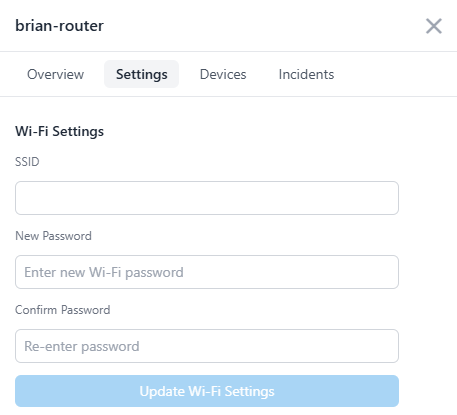
Accessed by selecting a router from the Devices Map and opening the Settings tab in the drawer, this section allows administrators to update the router’s wireless SSID and password.
Overview
The Wi-Fi Settings panel lets administrators configure the SSID (network name) and password for any Scout router within their organization. Updating these values ensures that each router’s wireless network is secure, unique, and clearly identifiable.
Each router configuration includes:
- SSID: The visible name of your Wi-Fi network
- New Password: The access key required to connect
- Confirm Password: A confirmation field to reduce errors before saving
How It Works
When a new router is first deployed, it uses the following default network credentials:
Network Name: Bastion
Password: ScoutSecured
Administrators should change both the SSID and password immediately after installation to secure the environment.
To update your Wi-Fi settings:
- From the Dashboard, click the router you wish to modify on the network map.
- In the drawer that appears, open the Settings tab.
- Enter a new SSID and password (minimum 8 characters).
- Click Update Wi-Fi Settings to apply the change.
The router will briefly restart its wireless interface while applying new credentials. Connected devices will need to rejoin using the updated network name and password.
Why It Matters
Changing the default Wi-Fi credentials is one of the most important steps in securing your Scout deployment. Default credentials are publicly known and often targeted by automated attacks. Unique SSIDs also help distinguish routers across sites, improving network visibility.
Key benefits include:
- Stronger protection against unauthorized wireless access
- Reduced risk of credential reuse or brute-force attempts
- Simplified management of multiple routers across locations
- Clear visual identification of network zones or offices
Tips and Best Practices
- Use short, recognizable SSIDs such as
HQ-SecureorStore1-WiFi. - Create complex passwords containing uppercase, lowercase, numbers, and symbols.
- Avoid personal names or organization identifiers in SSIDs.
- Store updated credentials securely in Vault for authorized access.
- All Wi-Fi configuration changes are recorded in the Audit Log for traceability.
Updating Wi-Fi settings will briefly disconnect connected devices. They must reconnect using the new network name and password once the router restarts.