The Connectivity Adoption card appears on the right side of the dashboard and shows how much of your Scout infrastructure is currently active and connected.
Overview
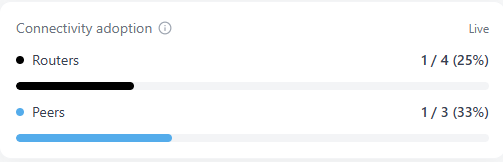
The Connectivity Adoption card provides a quick view of how many of your deployed Scout devices are online and communicating with the secured network. It tracks both Routers (on-premise or branch gateways) and Peers (remote or mobile devices connected through the VPN).
This metric helps you measure adoption across your organization and confirm that users, sites, and devices are actively participating in the protected environment.
How It Works
Scout continuously monitors VPN sessions and device heartbeats to determine connectivity status. The card displays two main values:
- Routers: The number of connected routers out of all registered routers.
- Peers: The number of connected peers out of all registered peers.
Each value is shown as both a fraction and a percentage for quick interpretation.
Example:
- Routers →
1 / 4 (25%) - Peers →
1 / 3 (33%)
A Live indicator confirms that this data is updated in real time through the backend API.
Why It Matters
Connectivity Adoption helps administrators monitor both usage and coverage of the Scout platform. By tracking active connections, you can quickly identify:
- Locations or users that have not completed setup
- Devices that have gone offline or lost connectivity
- Underutilized peers that may need troubleshooting or user outreach
Maintaining high connectivity ensures every device benefits from Scout’s inspection, filtering, and protection services.
Tips and Best Practices
- Hover over each bar for detailed counts and percentages.
- Investigate sudden drops in either group to rule out network or VPN disruptions.
- Consistently low adoption percentages often point to onboarding or configuration issues.
- Aim for 100% connectivity to maintain complete visibility and security coverage.
Connectivity data updates continuously as devices join or leave the network. Use this card to validate full protection coverage across all users and locations.