This guide walks administrators through initial VPN setup using Scout routers and optional direct peer connections.
Purpose
At this stage of maturity, the goal is to establish a secure baseline by ensuring all devices communicate through the encrypted Scout VPN. This provides confidentiality, integrity, and trusted routing for every connected environment.
Connecting Through a Scout Router (Recommended)
Most users will connect automatically through the Scout router’s Wi-Fi network.
- Power on and connect the Scout router following the Initial Router Setup.
- Join the Bastion Wi-Fi network using the credentials provided by the administrator.
- Once connected, all network traffic will route through the encrypted Scout VPN automatically.
This method offers the highest level of protection by isolating connected devices from the rest of the local network.
Direct VPN Peer Access
Administrators and approved users can also connect directly to the VPN from laptops, phones, or tablets when working remotely.
- Log in to the Scout Web App.
Note: Only administrators can access this portal. - Select Settings from the sidebar.
- Under the Organization → VPN Access section, locate your device entry.
- Choose one of the following:
- Scan QR Code using a mobile VPN app.
- Download Config to import into a desktop VPN client.
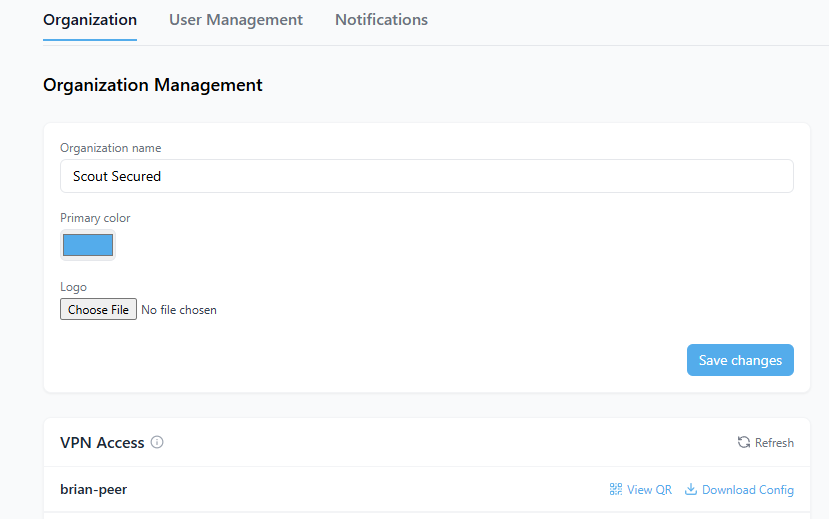
Once configured, the device will encrypt all traffic through Scout’s VPN tunnel, applying the same inspection and protections as router-based connections.
Security Practices
- Prefer router connections for stronger segmentation and lower management overhead.
- Keep configuration files private; they contain unique authentication credentials.
- Do not share VPN files or QR codes with other users.
- Revoke credentials immediately if a device is lost or compromised.
What Success Looks Like
- All user and office networks route traffic through the Scout VPN.
- Administrators can confirm devices appear under the Devices Online dashboard card.
- External IP addresses resolve to the Scout Secured gateway rather than local ISPs.
Completing this step establishes the Foundation level of Scout’s Security Maturity Model. Continue monitoring VPN-connected devices and metrics to progress toward Level 2 Visibility.