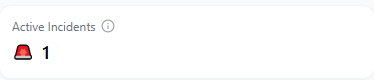
The Active Incidents card appears in the top-left corner of the main dashboard and displays the total number of incidents that remain open or under investigation.
Overview
The Active Incidents card provides a quick snapshot of ongoing investigations within your organization. It shows how many incidents are currently unresolved, including those marked as New or Investigating.
Incidents that have been Contained or Resolved are excluded from this count, keeping the focus on what still requires attention.
This card serves as an immediate indicator of your current security workload when you log into the Scout Dashboard.
How It Works
Each incident reported through Scout’s monitoring system moves through defined lifecycle stages:
- New: Recently detected and awaiting triage
- Investigating: Under active review by the administrator or team
- Contained: Mitigated but pending verification or closure
- Resolved: Fully addressed and closed
The Active Incidents card counts only those in the New or Investigating states. As incidents progress to Contained or Resolved, the number decreases automatically.
Why It Matters
This card provides immediate insight into your organization’s current security posture and response efficiency.
A higher number of active incidents can indicate:
- Increased threat activity or suspicious behavior
- Ongoing investigations that may need prioritization
- Delays in containment or closure processes
A lower or zero count suggests that threats are being handled effectively and that the environment is stable.
Monitoring this card helps ensure that no open issue remains overlooked and supports early escalation when workload spikes.
Tips and Best Practices
- Review this number regularly to maintain situational awareness.
- Compare with trend metrics such as Incidents by Severity and Average Response Time (MTTR) for context.
- Investigate sudden increases to confirm whether they stem from new detections, reclassified alerts, or configuration changes.
- Keep the metric accurate by promptly closing or updating incident statuses in the Incident Board.
The Active Incidents card updates in real time as incidents are detected, investigated, or closed. It provides your first indicator of network health after logging in.