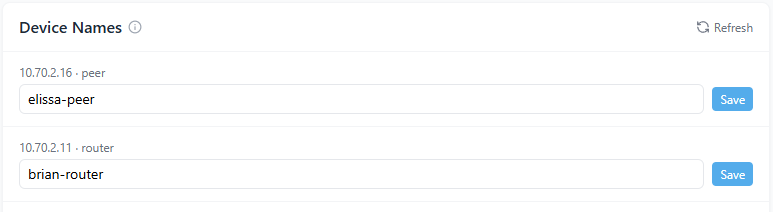
Found under Settings → Organization → Device Names, this section allows administrators to rename routers and peers for easier identification across the network.
Overview
The Device Names page lets administrators rename routers and peers connected to their organization’s network. These names appear throughout the Scout Admin Panel (including dashboards, audit logs, and reports) helping teams clearly identify devices and their purpose.
Each table entry includes:
- Internal IP Address: The VPN-assigned address for the device
- Device Type: Indicates whether the entry is a router or peer
- Device Name: A customizable label editable by administrators
How It Works
Scout automatically assigns each new router and peer a default name during registration. Administrators can update these names at any time for clarity and organization.
To rename a device:
- Open the Device Names section under Settings.
- Locate the router or peer you want to rename.
- Enter a new name in the editable field (for example,
office-router,alex-peer, orshop-gateway). - Click Save to apply the change immediately.
Updated names propagate instantly across the platform and appear in dashboards, metrics, and audit logs.
Why It Matters
Meaningful device names simplify network management, speed up investigations, and reduce confusion in multi-site environments. They help administrators quickly identify which user, office, or function each device serves.
Key benefits include:
- Faster correlation during incident triage and forensics
- Easier management of distributed or large-scale deployments
- Improved clarity in audit trails and compliance reporting
Tips and Best Practices
- Use short, descriptive names that convey both user and purpose (for example,
hq-routerormaria-laptop). - Avoid spaces or special characters; use hyphens or underscores for readability.
- Update device names after reassignments, hardware swaps, or network changes.
- All changes are recorded in the Audit Log for visibility and accountability.
Device names are purely visual identifiers and do not affect connectivity, routing, or security policies. Changes take effect immediately across all interfaces.