The Critical Incident Resolution card appears on the right side of the dashboard and measures how quickly critical incidents are detected, investigated, and resolved.
Overview
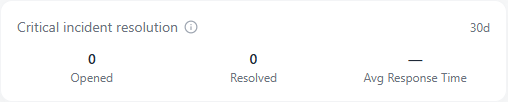
The Critical Incident Resolution card tracks how your organization handles its most severe security events. It summarizes the number of critical incidents opened, resolved, and the average response time between detection and closure within the last 30 days.
This card provides a direct measure of your ability to respond to high-impact threats effectively and efficiently.
How It Works
Every incident within Scout’s tracking system is assigned a severity level based on the potential impact to your organization. The Critical Incident Resolution card focuses exclusively on those labeled as Critical.
The metrics displayed include:
- Opened: The number of new critical incidents created during the past 30 days
- Resolved: The number of critical incidents successfully closed during the same period
- Average Response Time: The mean time between an incident being detected and resolved
If no critical incidents were opened or resolved in the timeframe, the response time field will display a dash (—).
Why It Matters
Critical incidents represent your highest-priority threats which are events that could cause major operational disruption or data compromise if left unresolved. This metric shows how well your response processes perform under pressure.
A strong record here indicates:
- Efficient coordination and containment processes
- Adequate staffing and clear escalation procedures
- Rapid detection-to-resolution turnaround times
Conversely, a growing gap between opened and resolved incidents may indicate investigation backlogs or insufficient resources.
Tips and Best Practices
- Review this metric during incident review meetings or monthly operations summaries.
- Pair this data with Average Response Time (MTTR) for a full picture of overall response health.
- Investigate any spike in Opened incidents to identify new threats or recurring vulnerabilities.
- Ensure your SLA Policies align with the resolution performance shown here.
The Critical Incident Resolution card automatically updates every 24 hours to reflect activity from all Scout-monitored devices and tenants.