Overview
Vault begins your journey toward secure password management by establishing a personal, encrypted credential store. At this level, the focus is on individual security, ensuring administrators and users alike adopt strong password practices within the Scout-protected network.
Setting up Vault provides a foundation for identity security, enabling encrypted storage and autofill for everyday use while preparing for future team collaboration.
Step 1: Install the Browser Extension
The easiest way to use Vault is through the Scout Vault Chrome Extension, which integrates directly with your browser for autofill and credential capture.
- Install the Scout Vault Chrome Extension.
- Ensure your device is connected to the Scout VPN before creating or logging into an account.
- Confirm that “Logging in on:” displays
Scout, then click Create Account.
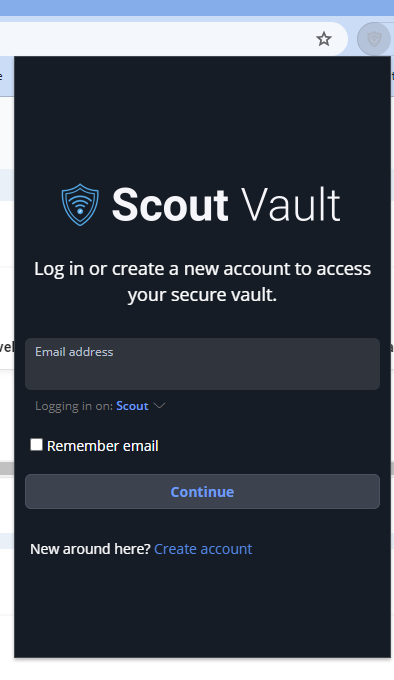
- Complete the registration form and accept the Terms of Service and Privacy Policy.
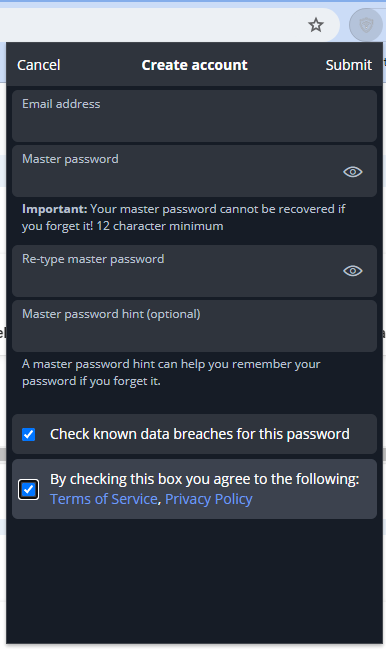
- Follow any email verification instructions to finalize setup.
Once connected, the extension will sync securely with your personal Vault account and enable encrypted autofill for logins.
Step 2: Add Your First Credentials
After signing in, add at least one credential entry to confirm Vault is functioning properly.
- Click Add Item in the Vault interface.
- Choose a category such as Login or Secure Note.
- Enter the service name, username, and password.
- Save the entry to your personal vault.
You can now use Vault to automatically fill login forms for saved sites and generate new passwords as needed.
Step 3: Strengthen Personal Security
Before expanding to organization-level use, take the time to reinforce good personal security hygiene:
- Use unique passwords for every account stored in Vault
- Enable browser lock timeout to protect against unattended access
- Store your Vault recovery key in a secure location
- Avoid syncing Vault credentials outside of the Scout-protected network
These small steps prevent common misconfigurations that can compromise otherwise strong password management systems.
Maturity Progress
Completing this stage establishes the Foundation 🟢 for credential security. Users now have a personal, encrypted password store integrated with the Scout network.